
In today’s world, you can make great videos without spending money. The top 10 free video editing software give you tools to cut clips, add effects, and share your work. These programs work for new users and skilled editors. They run on computers like Windows, Mac, and Linux. Many come from trusted makers with years of updates. Pick one that fits your needs, like simple cuts or pro color fixes.
Video editing started simple but grew with tech. Now, free tools match paid ones in many ways. Stats show over 500 million people edit videos each year, per industry reports. Free software helps creators save cash while learning skills. We picked these based on features, ease, and user feedback from sites like Zapier. Let’s dive in.
What Makes Good Free Video Editing Software?
Look for key things when choosing. First, check if it has no watermarks on exports. Second, see if it supports 4K video. Third, find easy timelines for adding clips. Also, good software offers effects, music tools, and fast renders. Open-source options like some in our list get free updates from communities. Avoid tools with too many ads or limits on saves.
Our Picks for the Top 10 Free Video Editing Software
We ranked these based on power, user ratings, and features. Each one is truly free for core use. Here’s the list:
- DaVinci Resolve Blackmagic Design made DaVinci Resolve in 2004. It began as a color tool for movies but grew into a full editor. Hollywood films like “The Martian” used it. The free version handles pro work without limits on basics. Key Features:
- Cut and edit on timelines with multi-cam support.
- Fix colors with wheels and curves for vivid looks.
- Add audio mixes in Fairlight tab.
- Use Fusion for effects like green screen.
- Export to 4K at 60fps in common formats. Pros:
- Pro tools at no cost.
- Works on Windows, Mac, Linux.
- Big community with tutorials. Cons:
- Takes time to learn.
- Needs a strong computer for smooth runs. Tips: Start with the Cut page for quick edits. Download from their site and watch free guides. Users rate it 4.8 stars on average. For mobile edits, consider apps like VN Video Editor, which offers similar easy tools.
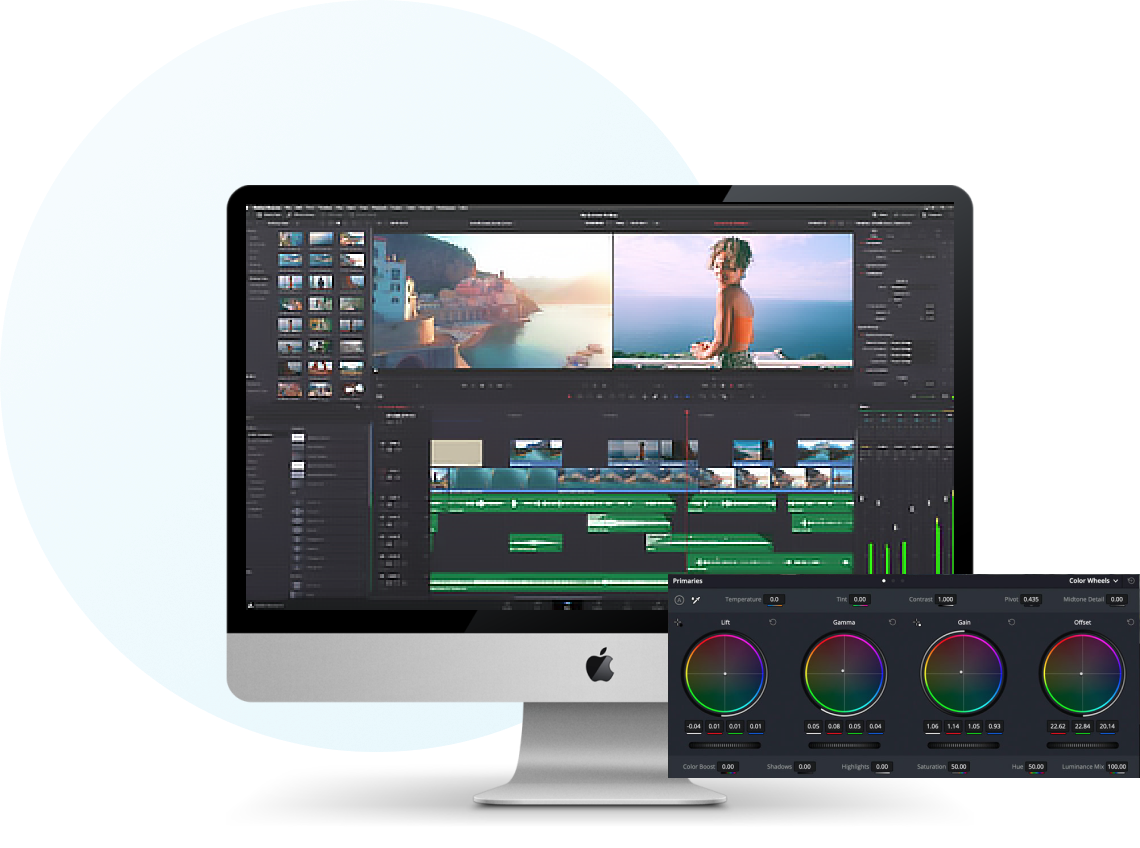
This software tops lists for its depth. Over 10 million downloads show its popularity.
- HitFilm Express FXhome launched HitFilm Express in 2011. It focuses on visual effects for films. Indie filmmakers love it for free VFX packs. The free tier includes over 400 effects. Key Features:
- Timeline editing with layers.
- 3D compositing and particle sims.
- Color grading and audio tools.
- Green screen keying.
- Export up to 4K. Pros:
- Great for effects without extra pay.
- Regular updates with new packs.
- Cross-platform support. Cons:
- Some advanced packs cost extra.
- Interface feels busy at first. Tips: Use free tutorials on their YouTube. Add effects packs as you need. Ratings hit 4.5 stars from users who make short films. It’s ideal for action video creators.
- Shotcut Meltytech started Shotcut in 2011 as open-source. It’s free forever with no ads. Users build on it through code shares. Key Features:
- Multi-track timeline.
- Wide format support like 4K.
- Filters for video and audio.
- Keyframes for animations.
- Hardware speed-up on GPUs. Pros:
- No watermarks or limits.
- Lightweight and fast.
- Runs on all major OS. Cons:
- Less polished look.
- Fewer built-in templates. Tips: Drag clips to timeline and apply filters. Community forums help with issues. Over 5 million downloads, with 4.4 star ratings.
- OpenShot Jonathan Thomas created OpenShot in 2008. It’s open-source for simple edits. Focuses on ease for new users. Key Features:
- Unlimited tracks.
- Curve-based animations.
- Titles and 3D effects.
- Audio waveforms.
- Export to many formats. Pros:
- Very user-friendly.
- Free updates often.
- Low system needs. Cons:
- Slower on big projects.
- Basic color tools. Tips: Use clip properties for quick changes. Join their Reddit for tips. Users give it 4.3 stars for beginner use.

- Lightworks Free EditShare owns Lightworks Free, started in 1989. Used on films like “Pulp Fiction.” Free version limits to 720p exports. Key Features:
- Pro timeline with bins.
- Real-time effects.
- Audio mixing.
- Boris FX for titles.
- Sync with other tools. Pros:
- Hollywood-grade interface.
- Stable for long edits.
- Community presets. Cons:
- 720p limit in free.
- Steep learning curve. Tips: Organize clips in bins first. Free version suits social media. Ratings at 4.2 stars from pros.
- VSDC Free Video Editor Flash-Integro made VSDC Free Video Editor in 2011. It’s for Windows with non-linear editing. Key Features:
- Masking and blending.
- 360 video support.
- Chroma key.
- Motion tracking.
- 4K exports. Pros:
- Advanced tools free.
- Hardware acceleration.
- No watermarks. Cons:
- Windows only.
- Cluttered menu. Tips: Use wizard for quick starts. Over 1 million users rate it 4.1 stars.
- iMovie Apple released iMovie in 1999. It’s for Mac and iOS with seamless sync. Key Features:
- Drag-drop editing.
- Themes and trailers.
- Green screen.
- Audio edits.
- 4K support. Pros:
- Free on Apple devices.
- Easy for beginners.
- Integrates with Photos. Cons:
- Apple only.
- Limited pro features. Tips: Use Magic Movie for auto edits. 4.6 star ratings from Apple users.
- Blender Blender Foundation began Blender in 1998 for 3D but added video editing. Key Features:
- Video sequencer.
- 3D modeling integration.
- Effects strips.
- Audio scrubbing.
- Render farm support. Pros:
- All-in-one for 3D videos.
- Open-source free.
- Cross-platform. Cons:
- Not just for video.
- Complex for simple tasks. Tips: Switch to Video Editing workspace. Community has 4.5 star feedback.
- Kdenlive KDE community started Kdenlive in 2002. Open-source with MLT framework. Key Features:
- Proxy editing for speed.
- Titler tool.
- Color scopes.
- Multi-cam.
- AV1 exports. Pros:
- Free and powerful.
- Linux native but multi-OS.
- Active devs. Cons:
- Bugs sometimes.
- Less tutorials. Tips: Use effects library. 4.4 stars from open-source fans.
- VideoPad NCH Software made VideoPad in 2008. It’s for quick home edits. Key Features:
- 360 video.
- Transitions library.
- Audio effects.
- Upload direct.
- 4K support. Pros:
- Simple interface.
- Fast exports.
- Windows/Mac. Cons:
- Free version limits features.
- Ads in free. Tips: Use storyboard mode. 4.0 stars average.
How These Compare
| Software | Best For | Platforms | Rating |
|---|---|---|---|
| DaVinci Resolve | Pros | Win/Mac/Linux | 4.8 |
| HitFilm Express | Effects | Win/Mac | 4.5 |
| Shotcut | Open-source | All | 4.4 |
| OpenShot | Beginners | All | 4.3 |
| Lightworks Free | Films | Win/Mac/Linux | 4.2 |
| VSDC Free Video Editor | Advanced | Win | 4.1 |
| iMovie | Apple users | Mac/iOS | 4.6 |
| Blender | 3D | All | 4.5 |
| Kdenlive | Linux | All | 4.4 |
| VideoPad | Quick | Win/Mac | 4.0 |
These tools beat others by offering more without paywalls. For example, if you worry about app bans like CapCut’s issues, switch to these safe picks. Read more on CapCut ban and alternatives. Status in 2026 shows CapCut still around but risky.
Tips for Getting Started
- Pick based on your device.
- Learn basics: Import clips, cut, add text.
- Use free music from sites.
- Export in MP4 for wide share.
- Join forums for help.
FAQs on Top 10 Free Video Editing Software
What is the best top 10 free video editing software for beginners? OpenShot or iMovie work well with simple drags.
Do these top 10 free video editing software have watermarks? No, core versions export clean.
Can I use top 10 free video editing software for pro work? Yes, DaVinci Resolve handles films.
Which top 10 free video editing software supports 4K? Most like Shotcut and Blender do.
Are there mobile options in top 10 free video editing software? iMovie has iOS; try others on desktop.
Conclusion
The top 10 free video editing software like DaVinci Resolve, HitFilm Express, and others give you power without fees. They cover cuts, effects, and exports for all levels. Start small and build skills. For more tech news, check BizReporterz. Which of these top 10 free video editing software will you try first?
References
- VN Video Editor on Google Play: Details on mobile editing app with no watermark. Useful for beginners.
- Descript Blog on CapCut Ban: Explains risks and alternatives, targeting content creators worried about app access.
- Zapier Blog on Best Free Video Editing Software: Comprehensive reviews for users seeking tested options.