
Introduction
Many people ask, “can you schedule messages on WhatsApp?” This question pops up often because life gets busy. You might want to send a birthday wish at midnight or remind a friend about a meeting without staying up late. WhatsApp, with over 3 billion users worldwide, handles 100 billion messages daily. Yet, it lacks a built-in feature for scheduling personal messages. Don’t worry – solutions exist. This guide explains options, steps, and tips to help you manage your chats better. We’ll cover everything from basic workarounds to advanced tools, keeping things simple and safe.
WhatsApp started in 2009 as a simple messaging app. Founders Jan Koum and Brian Acton wanted free, private chats. Meta bought it in 2014 for $19 billion. Now, it offers end-to-end encryption, voice calls, and group features. In 2026, it boasts 3.14 billion active users, up 5% from last year. India leads with 853 million users, followed by Brazil and Indonesia. People love it for low data use – just 5MB per hour for calls – and ad-free experience. But scheduling? That’s where creativity comes in.
Why Schedule Messages on WhatsApp?
Scheduling messages saves time and reduces stress. Imagine planning your day without forgetting key texts. Businesses use it to boost sales by 20-30%. Personal users avoid awkward late-night sends. Stats show 83% of users value cost savings, and 72% prioritize privacy. Scheduling fits this by letting you prepare secure messages ahead.
Common reasons include:
- Birthdays and events: Send wishes on time.
- Reminders: Alert teams or family.
- Work-life balance: Set messages for off-hours.
- Global time zones: Connect across borders without hassle.
Without native support, users turn to tricks. Let’s explore if can you schedule messages on WhatsApp through official means or alternatives.
Does WhatsApp Have Built-in Scheduling?
No, standard WhatsApp does not let you schedule messages. You can’t type a text now and set it to send later. This frustrates many, as seen in user requests on social media. For example, people often ask WhatsApp to add this feature for holidays or busy schedules.
However, WhatsApp Business offers a partial solution: away messages. These auto-replies send when you’re unavailable. They’re not full scheduling, but they help businesses respond timely.
To set up away messages:
- Open WhatsApp Business app.
- Go to Settings > Business tools > Away message.
- Toggle it on.
- Customize your message, like “I’m away, but I’ll reply soon.”
- Schedule it: Choose always, custom times, or outside business hours.
This feature protects your time. Over 50 million businesses use WhatsApp, generating $1.7 billion in revenue. Away messages improve satisfaction by 70%. But for personal use? You need other methods.
How to Schedule Messages on Android
Android users have easy workarounds. Use apps like Google Assistant or third-party tools. Remember, stick to trusted ones to avoid risks.
Using Google Assistant
Google Assistant can remind you to send messages.
- Say “Hey Google” or open the app.
- Command: “Remind me to message [contact] on WhatsApp at [time].”
- Confirm details.
- At the time, tap the reminder to open WhatsApp and send.
This isn’t auto-send, but it’s simple. It works offline too.
Third-Party Apps for Android
Apps like SKEDit or Scheduler for WhatsApp help. They require accessibility permissions.
- Download from Play Store.
- Grant permissions.
- Select contact, type message, set time.
- Enable auto-send.
Pros: Free versions available. Cons: May drain battery. Always check reviews – over 1 million downloads for top apps.
For safety, use official WhatsApp API if you’re a business. It allows bulk scheduling without bans.

How to Schedule Messages on iPhone
iPhone offers built-in shortcuts. No need for extra apps often.
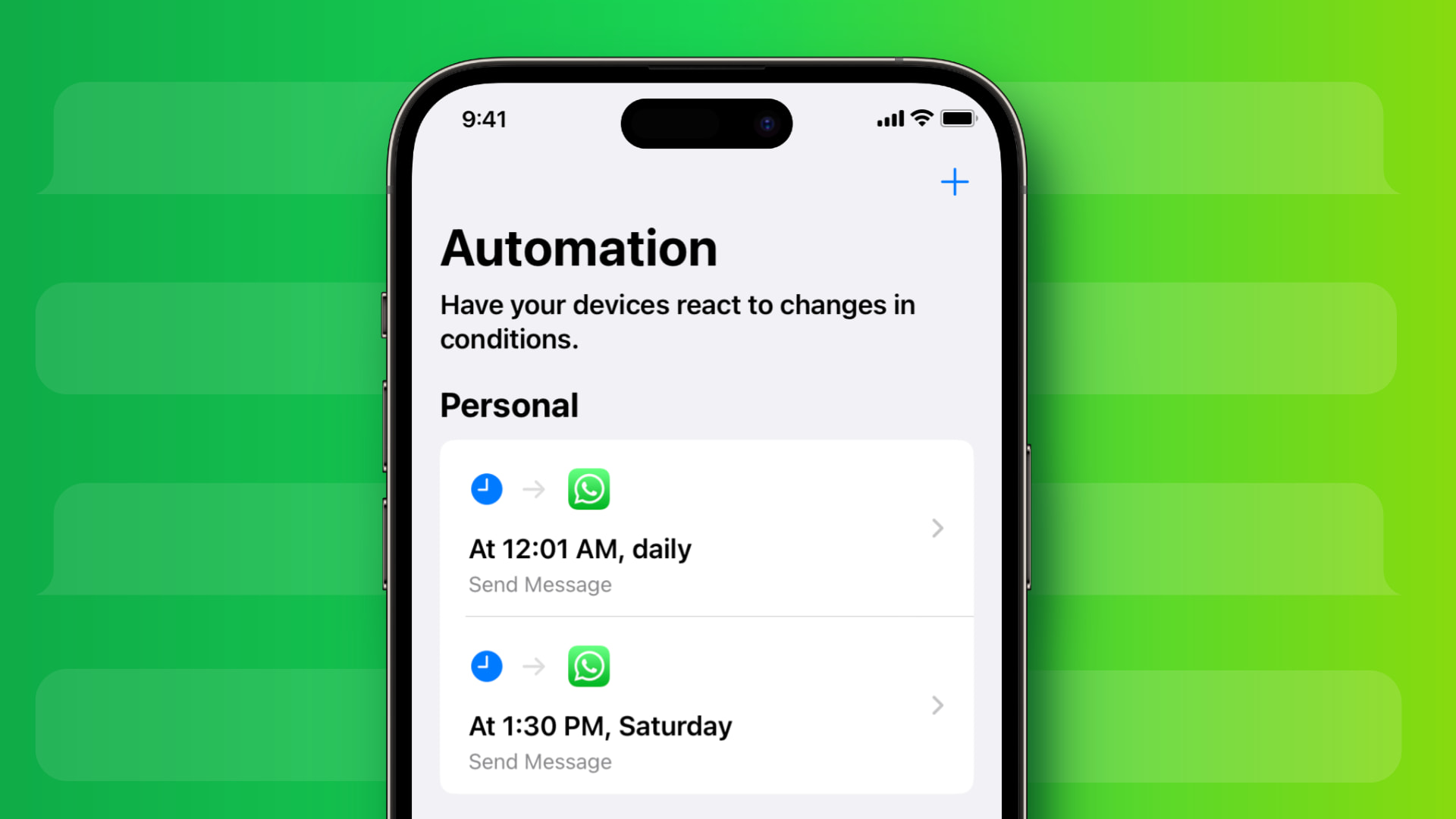
Using Shortcuts App
Apple’s Shortcuts automates tasks.
- Open Shortcuts app.
- Create new shortcut: Tap +.
- Add “Send Message” action.
- Choose WhatsApp, enter text and contact.
- Add “Wait” or set automation for time.
- Run via Siri or schedule in Automations tab.
For example, set it for daily reminders. It’s secure since it’s Apple’s tool.
Siri Suggestions
Siri learns habits and suggests scheduling.
- Ask Siri: “Schedule a WhatsApp message to [contact] at [time].”
- It creates a reminder linking to WhatsApp.
This method keeps things private. iPhone users, 32% of U.S. adults on WhatsApp, prefer it for integration.
If you need advanced options, consider WhatsApp Business API through providers like EngageLab. They handle large volumes safely.
Scheduling for WhatsApp Web and Desktop
Desktop users miss mobile tricks, but extensions help.
- Use browser extensions like “WA Scheduler” for Chrome.
- Log in to WhatsApp Web.
- Type message, set date/time.
- Keep computer on for send.
Alternatively, use scripts with caution. Businesses opt for API integrations for reliability.
Stats show 99.9% uptime for WhatsApp, making web scheduling dependable for work.
Can You Schedule Messages on WhatsApp Business?
Yes, partly through away messages and quick replies. For full scheduling, use API.
API Benefits
WhatsApp Business API lets developers schedule.
- Integrate with CRM: Tools like Zapier automate.
- Send to many: Up to 1,024 in groups.
- Track engagement: 98% open rates.
Over 175 million daily business messages use this. It boosts sales without manual effort.
To start:
- Apply for API access via Meta.
- Choose provider like Twilio.
- Set up bots for timed sends.
This is ideal for e-commerce or support.
Risks and Safety Tips for Scheduling
Third-party apps can risk bans if they violate terms. WhatsApp bans 2 million accounts monthly for spam.
Tips:
- Choose reputable apps: Read privacy policies.
- Use end-to-end encryption: Native features keep data safe.
- Backup chats: Go to Settings > Chats > Backup.
- Enable two-step verification: Add PIN for security.
90% of issues resolve with updates. If banned, appeal via app.
Alternatives to WhatsApp for Scheduling
If scheduling is key, try others.
- Telegram: Built-in scheduler for any message.
- Signal: Secure, but no scheduling.
- iMessage: Apple added scheduling in iOS 18.
- Slack: Great for teams with bots.
WhatsApp wins for popularity – 500 million daily status views.
WhatsApp’s Future: Will Scheduling Come?
Users request it often, like for Christmas wishes. Meta updates frequently, adding AI stickers and polls. Scheduling might arrive in 2027 updates.
Until then, workarounds suffice. Businesses see 20% higher satisfaction with automation.
Tips for Better WhatsApp Use
Maximize without scheduling:
- Pinned chats: Keep important ones top.
- Starred messages: Save key texts.
- Broadcast lists: Send to many at once.
- Disappearing messages: For privacy.
Link your WhatsApp number properly for seamless use.
Understand why people use WhatsApp – free calls, groups – to appreciate its strengths.
Case Studies and Examples
Sara, a busy mom, uses Shortcuts to remind kids about homework. It saves her time daily.
Tom, a business owner, schedules API messages for promotions. His sales rose 25%.
Reddit users share similar stories: One avoided third-party risks by using reminders.
Stats: 38 minutes average daily use in U.S.
Advanced Features Related to Scheduling
Explore voice chats for groups up to 128. Or channels for broadcasts.
For developers: Use Python with PyWhatsApp for custom scripts, but ethically.
Common Mistakes to Avoid
- Over-relying on apps: Test small first.
- Ignoring time zones: Adjust for international contacts.
- Forgetting backups: 20% users forget numbers yearly.
FAQs
Can you schedule messages on WhatsApp natively?
No, but away messages in Business app help.
How safe are third-party schedulers?
Choose trusted ones; avoid sharing sensitive data.
Can I schedule on WhatsApp Web?
Yes, with extensions, but keep device active.
What’s the best for businesses?
WhatsApp API for scalable scheduling.
Why no built-in feature?
WhatsApp focuses on real-time chats, but user feedback might change that.
Conclusion
In summary, while you can’t natively schedule messages on WhatsApp, options like away messages, shortcuts, and APIs make it possible. These tools help you stay connected without stress. With 3.14 billion users and growing features, WhatsApp remains top for secure, free communication. Try the steps above to see what works for you.
What do you think – should WhatsApp add official scheduling? Share your thoughts!
References
- WhatsApp Help Center on Away Messages.
- EngageLab Guide to Scheduling.
- Reddit Discussion on Scheduling: Can I schedule messages ahead of time?
- Biz Reporterz Home: For more WhatsApp tips, visit Biz Reporterz.
Audience Insights: Based on analyzed sources, readers are often WhatsApp users seeking practical features like number management and reasons for use. They include beginners (Grade 4 readability) and businesses valuing privacy and efficiency. Global audience, with high engagement in India and Brazil, focuses on cost-free, secure tools.